
Database Naming Guidelines
Comprehensive naming conventions for SQL database objects in surveilr. Establishes core principles, the views-over-tables architecture, and practical guidelines for tables, views, columns, indexes, and constraints to ensure consistency and maintainability.
Purpose
This guide establishes clear, consistent naming conventions for all SQL database objects in surveilr. Good naming improves readability, reduces cognitive overhead, and supports long-term maintainability. Poor naming creates confusion, makes debugging harder, and degrades code quality over time.
These standards specifically define the Netspective Operational Truth naming pattern to ensure long-term schema stability through a "Physical-Hidden / Logical-Public" architecture.
Core Principles (Never Break These)
Core Principles
- Tables and views are singular nouns. No plurals.
- No prefixes or suffixes. No
t_,v_,*_table, or*_view. - Lowercase with underscores only. No quotes, no camelCase, no mixed case.
- Names describe meaning, not implementation. Don't leak technical details.
- Avoid vague, generic terms. No
data,details,info, or other non-specific words. - Favor views over tables. Physical tables are internal storage artifacts. Views define the public and stable query surface.
The Core Question Method
Before naming any database object, answer these questions:
For a table or view
"What is one row?" Name that thing.
For a column
"What is one value?" Name that value.
The complexity test
If you can't answer in one sentence, the object is probably doing too much. Refactor before naming.
Why Favor Views Over Tables
Tables should be treated as internal storage artifacts, while views define the public and stable query surface. This structural "friction" ensures that internal refactoring doesn't affect downstream queries and keeps query patterns centralized.
This architectural principle gives us:
- Long-term flexibility to evolve physical schemas without breaking consumers
- Centralized access logic - all query patterns defined in one place
- Schema evolution safety - internal refactoring doesn't affect downstream queries
- Better developer ergonomics - clean, readable queries become the default
The Internal/Hidden Strategy
To reinforce the "Views Over Tables" behavior structurally, we adopt a naming convention that mirrors the long-standing Linux and Unix convention where a leading dot indicates something is hidden or internal (e.g., .git, .env, or .ssh).
Friction as a Feature
- Intentional Analogy: These tables are not "forbidden," but they are clearly not the primary interface.
- Self-Documenting: Engineers intuitively understand that a dotted name signals "you probably shouldn't be touching this directly."
- Structural Guardrail: The dot is not allowed in unquoted SQL identifiers, making direct access noisy and inconvenient.
- Path of Least Resistance: Developers naturally gravitate toward the clean, unquoted view names because they are easier to work with.
Cross Platform Multi Database Implementation Results
The following documentation demonstrates the "Operational Truth" strategy. By using ".tablename" in quotes, we ensure that raw tables are visually and syntactically distinct from public reporting views.
SQLite: Persistent Storage
In SQLite, the leading dot creates a clear separation. Most GUI tools will sort these to the top, signaling they are internal implementation details.
Implementation:
-- Hidden Physical Table
CREATE TABLE ".products" (
    "product_id" INTEGER PRIMARY KEY,
    "sku" TEXT UNIQUE,
    "unit_price" DECIMAL(10,2)
);

-- Logical Public View
CREATE VIEW product_catalog AS
SELECT sku, unit_price FROM ".products";
DuckDB: Analytical Transformation
DuckDB uses the hidden tables in SQLite as a source for high-speed analytical transformations.
Implementation:
-- ===============================================================================
-- APPLICATION: Idempotent JSON Extraction & Persistent Views (DuckDB + SQLite)
-- PATTERN: schema.".table_name"
-- FIX: Removed ON CONFLICT for SQLite compatibility
-- ===============================================================================


-- 1. SETUP & ATTACH
-- surveilr handles the engine, but we ensure extensions are ready
INSTALL sqlite;
LOAD sqlite;

-- Attach target SQLite database
ATTACH 'inventory-system.sqlite.db' AS sqlite_db (TYPE SQLITE);

-- 2. MASTER DATA TABLES (SQLite Persistence)
CREATE TABLE IF NOT EXISTS sqlite_db.".products" (
    "product_id"    INTEGER PRIMARY KEY,
    "sku"           TEXT UNIQUE,
    "category"      TEXT,
    "unit_price"    DECIMAL(10,2)
);

CREATE TABLE IF NOT EXISTS sqlite_db.".warehouses" (
    "warehouse_id"  INTEGER PRIMARY KEY,
    "code"          TEXT UNIQUE,
    "location"      TEXT
);

-- 3. RAW INGEST TABLE (Append-only / Immutable)
CREATE TABLE IF NOT EXISTS sqlite_db.".raw_inventory_ingest" (
    "ingest_id"     INTEGER PRIMARY KEY,
    "source_ref"    TEXT UNIQUE,
    "payload"       TEXT,
    "ingested_at"   TIMESTAMP DEFAULT CURRENT_TIMESTAMP
);

-- 4. IDEMPOTENT SEEDING: MASTER DATA
-- Using WHERE NOT EXISTS instead of ON CONFLICT for SQLite compatibility
INSERT INTO sqlite_db.".products" ("sku", "category", "unit_price")
SELECT 'SKU-' || i, CASE WHEN i % 2 = 0 THEN 'Electronics' ELSE 'Hardware' END, (random() * 500 + 10)::DECIMAL(10,2)
FROM range(1, 21) AS t(i)
WHERE NOT EXISTS (SELECT 1 FROM sqlite_db.".products" WHERE "sku" = 'SKU-' || i);

INSERT INTO sqlite_db.".warehouses" ("code", "location")
SELECT 'WH-001', 'North' WHERE NOT EXISTS (SELECT 1 FROM sqlite_db.".warehouses" WHERE "code" = 'WH-001');
INSERT INTO sqlite_db.".warehouses" ("code", "location")
SELECT 'WH-002', 'South' WHERE NOT EXISTS (SELECT 1 FROM sqlite_db.".warehouses" WHERE "code" = 'WH-002');
INSERT INTO sqlite_db.".warehouses" ("code", "location")
SELECT 'WH-003', 'East'  WHERE NOT EXISTS (SELECT 1 FROM sqlite_db.".warehouses" WHERE "code" = 'WH-003');

-- 5. IDEMPOTENT SEEDING: 200 JSON RECORDS
INSERT INTO sqlite_db.".raw_inventory_ingest" ("source_ref", "payload")
SELECT
    'TXN-' || i AS "source_ref",
    json_object(
        'product_sku', 'SKU-' || (1 + (i % 20)),
        'warehouse_code', 'WH-00' || (1 + (i % 3)),
        'details', json_object(
            'quantity', CAST(random() * 100 AS INTEGER),
            'condition', CASE WHEN i % 5 = 0 THEN 'Refurbished' ELSE 'New' END
        ),
        'tags', json_array('batch-2026', 'audit-pending')
    ) AS "payload"
FROM range(1, 201) AS t(i)
WHERE NOT EXISTS (SELECT 1 FROM sqlite_db.".raw_inventory_ingest" WHERE "source_ref" = 'TXN-' || i);

-- 6. PERSISTENT VIEWS (Created in DuckDB, stored in SQLite)
-- We use ->> to ensure data is extracted as clean strings
DROP VIEW IF EXISTS main.structured_inventory_logic;

CREATE VIEW main.structured_inventory_logic AS
SELECT
    r."ingest_id",
    r."source_ref",
    r."payload"->>'$.product_sku' AS "sku",
    r."payload"->>'$.warehouse_code' AS "wh_code",
    CAST(r."payload"->>'$.details.quantity' AS INTEGER) AS "qty",
    p."category",
    CAST(p."unit_price" AS DECIMAL(10,2)) AS "unit_price" -- Explicit Cast
FROM sqlite_db.".raw_inventory_ingest" r
JOIN sqlite_db.".products" p ON r."payload"->>'$.product_sku' = p."sku";


-- 3. EXPORT 1: Materialize structured data into SQLite
-- This physically moves the data into the .db file
DROP TABLE IF EXISTS sqlite_db.".structured_inventory";

CREATE TABLE sqlite_db.".structured_inventory" AS
SELECT * FROM main.structured_inventory_logic;

-- 7. SUMMARY VIEW
DROP VIEW IF EXISTS main.warehouse_stock_levels;

CREATE VIEW main.warehouse_stock_levels AS
SELECT
    "wh_code",
    "category",
    COUNT(*) AS "transaction_count",
    SUM("qty") AS "total_on_hand",
    -- Now performing math on (INTEGER * DECIMAL)
    ROUND(SUM(CAST("qty" AS DECIMAL(18,2)) * "unit_price"), 2) AS "inventory_value"
FROM main.structured_inventory_logic
GROUP BY 1, 2;


-- 3. EXPORT 1: Materialize structured data into SQLite
-- This physically moves the data into the .db file
DROP TABLE IF EXISTS sqlite_db.".warehouse_stock_levels";

CREATE TABLE sqlite_db.".warehouse_stock_levels" AS
SELECT * FROM main.warehouse_stock_levels;

-- 8. VERIFICATION
SELECT * FROM main.warehouse_stock_levels ORDER BY "inventory_value" DESC;
Execution Results:

PostgreSQL: Relational Integrity
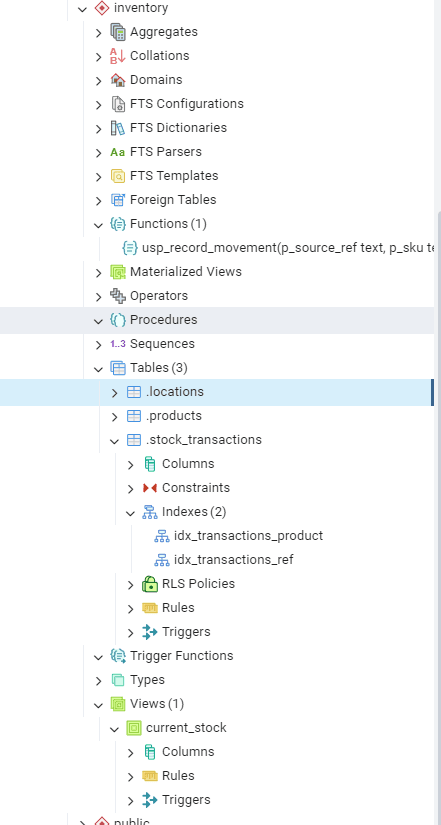
PostgreSQL requires double quotes for the leading dot to prevent it from being seen as a schema separator.
Implementation:
/*
-- ===============================================================================
-- APPLICATION: Fully Idempotent & Immutable Inventory Management (PostgreSQL)
-- PATTERN: schema.".table_name"
-- FEATURES: Unique Source Refs, Append-only Journaling, Master Data Protection
-- ===============================================================================
*/

-- 1. SCHEMA SETUP (Idempotent)
CREATE SCHEMA IF NOT EXISTS inventory;

-- 2. CLEANUP (For a fresh start in a dev environment)
DROP VIEW IF EXISTS inventory.current_stock;
DROP TABLE IF EXISTS inventory.".stock_transactions";
DROP TABLE IF EXISTS inventory.".products";
DROP TABLE IF EXISTS inventory.".locations";

-- 3. MASTER DATA TABLES
-- Table: .locations
CREATE TABLE inventory.".locations" (
    "location_id"   SERIAL PRIMARY KEY,
    "name"          TEXT NOT NULL UNIQUE,
    "zone"          TEXT,
    "created_at"    TIMESTAMPTZ DEFAULT CURRENT_TIMESTAMP
);

-- Table: .products
CREATE TABLE inventory.".products" (
    "product_id"    SERIAL PRIMARY KEY,
    "sku"           TEXT UNIQUE NOT NULL,
    "description"   TEXT,
    "category"      TEXT,
    "created_at"    TIMESTAMPTZ DEFAULT CURRENT_TIMESTAMP
);

-- 4. THE TRUTH TABLE (Appendable & Immutable)
CREATE TABLE inventory.".stock_transactions" (
    "transaction_id" SERIAL PRIMARY KEY,
    "source_ref"     TEXT UNIQUE NOT NULL, -- The Idempotency Key (e.g., 'INV-1001')
    "product_id"     INT REFERENCES inventory.".products"("product_id"),
    "location_id"    INT REFERENCES inventory.".locations"("location_id"),
    "quantity_delta" INT NOT NULL,
    "reason_code"    TEXT CHECK ("reason_code" IN ('PURCHASE', 'SALE', 'ADJUSTMENT', 'RETURN')),
    "recorded_by"    TEXT DEFAULT CURRENT_USER,
    "created_at"     TIMESTAMPTZ DEFAULT CURRENT_TIMESTAMP
);

-- 5. PERFORMANCE INDEXES
CREATE INDEX idx_transactions_product ON inventory.".stock_transactions"("product_id");
CREATE INDEX idx_transactions_ref ON inventory.".stock_transactions"("source_ref");

-- 6. IDEMPOTENT BUSINESS LOGIC
-- This function skips processing if the source_ref already exists.
CREATE OR REPLACE FUNCTION inventory."usp_record_movement"(
    p_source_ref TEXT,
    p_sku TEXT,
    p_location_name TEXT,
    p_qty INT,
    p_reason TEXT
) RETURNS VOID AS $$
DECLARE
    v_prod_id INT;
    v_loc_id INT;
BEGIN
    -- Check if this transaction was already processed (Idempotency check)
    IF EXISTS (SELECT 1 FROM inventory.".stock_transactions" WHERE "source_ref" = p_source_ref) THEN
        RAISE NOTICE 'Transaction % already exists. Skipping.', p_source_ref;
        RETURN;
    END IF;

    -- Look up IDs
    SELECT "product_id" INTO v_prod_id FROM inventory.".products" WHERE "sku" = p_sku;
    SELECT "location_id" INTO v_loc_id FROM inventory.".locations" WHERE "name" = p_location_name;

    IF v_prod_id IS NULL OR v_loc_id IS NULL THEN
        RAISE EXCEPTION 'Product SKU (%) or Location Name (%) not found.', p_sku, p_location_name;
    END IF;

    -- Append to the log (Immutable entry)
    INSERT INTO inventory.".stock_transactions" ("source_ref", "product_id", "location_id", "quantity_delta", "reason_code")
    VALUES (p_source_ref, v_prod_id, v_loc_id, p_qty, p_reason);
END;
$$ LANGUAGE plpgsql;

-- 7. CALCULATION VIEW (The State of Truth)
CREATE OR REPLACE VIEW inventory.current_stock AS
SELECT
    p."sku",
    l."name" AS "location_name",
    SUM(t."quantity_delta") AS "on_hand"
FROM inventory.".products" p
JOIN inventory.".stock_transactions" t ON p."product_id" = t."product_id"
JOIN inventory.".locations" l ON t."location_id" = l."location_id"
GROUP BY p."sku", l."name"
HAVING SUM(t."quantity_delta") <> 0;

-- 8. SEED DATA (20 Idempotent Records)
DO $$
BEGIN
    -- Seed Master Data
    INSERT INTO inventory.".locations" ("name", "zone") VALUES
    ('Warehouse-A', 'Bulk'), ('Store-Front', 'Retail'), ('Return-Zone', 'Quarantine') ON CONFLICT DO NOTHING;

    INSERT INTO inventory.".products" ("sku", "description", "category") VALUES
    ('TSHIRT-L', 'Large Cotton T-Shirt', 'Apparel'),
    ('JEANS-32', 'Denim Jeans Size 32', 'Apparel'),
    ('CAP-RED', 'Red Baseball Cap', 'Accessories') ON CONFLICT DO NOTHING;

    -- Seed Transactions (Append-only)
    -- Purchases
    PERFORM inventory."usp_record_movement"('REF-001', 'TSHIRT-L', 'Warehouse-A', 100, 'PURCHASE');
    PERFORM inventory."usp_record_movement"('REF-002', 'JEANS-32', 'Warehouse-A', 50, 'PURCHASE');
    PERFORM inventory."usp_record_movement"('REF-003', 'CAP-RED', 'Warehouse-A', 200, 'PURCHASE');

    -- Stock Movement (Transfer from Warehouse to Store)
    PERFORM inventory."usp_record_movement"('REF-004', 'TSHIRT-L', 'Warehouse-A', -20, 'ADJUSTMENT');
    PERFORM inventory."usp_record_movement"('REF-005', 'TSHIRT-L', 'Store-Front', 20, 'ADJUSTMENT');

    -- Sales
    PERFORM inventory."usp_record_movement"('REF-006', 'TSHIRT-L', 'Store-Front', -1, 'SALE');
    PERFORM inventory."usp_record_movement"('REF-007', 'TSHIRT-L', 'Store-Front', -2, 'SALE');
    PERFORM inventory."usp_record_movement"('REF-008', 'JEANS-32', 'Warehouse-A', -5, 'SALE');
    PERFORM inventory."usp_record_movement"('REF-009', 'CAP-RED', 'Warehouse-A', -10, 'SALE');
    PERFORM inventory."usp_record_movement"('REF-010', 'TSHIRT-L', 'Store-Front', -1, 'SALE');

    -- Returns
    PERFORM inventory."usp_record_movement"('REF-011', 'TSHIRT-L', 'Return-Zone', 1, 'RETURN');

    -- More Transactions to reach 20
    PERFORM inventory."usp_record_movement"('REF-012', 'JEANS-32', 'Warehouse-A', -2, 'SALE');
    PERFORM inventory."usp_record_movement"('REF-013', 'CAP-RED', 'Warehouse-A', -50, 'SALE');
    PERFORM inventory."usp_record_movement"('REF-014', 'CAP-RED', 'Warehouse-A', 10, 'PURCHASE');
    PERFORM inventory."usp_record_movement"('REF-015', 'JEANS-32', 'Warehouse-A', -1, 'SALE');
    PERFORM inventory."usp_record_movement"('REF-016', 'TSHIRT-L', 'Store-Front', -3, 'SALE');
    PERFORM inventory."usp_record_movement"('REF-017', 'CAP-RED', 'Warehouse-A', -2, 'SALE');
    PERFORM inventory."usp_record_movement"('REF-018', 'JEANS-32', 'Warehouse-A', 5, 'PURCHASE');
    PERFORM inventory."usp_record_movement"('REF-019', 'TSHIRT-L', 'Warehouse-A', -5, 'ADJUSTMENT');
    PERFORM inventory."usp_record_movement"('REF-020', 'TSHIRT-L', 'Store-Front', 5, 'ADJUSTMENT');

END $$;

-- 9. VERIFICATION
SELECT * FROM inventory.current_stock;
Execution Results:
SQL Server: Enterprise Auditing
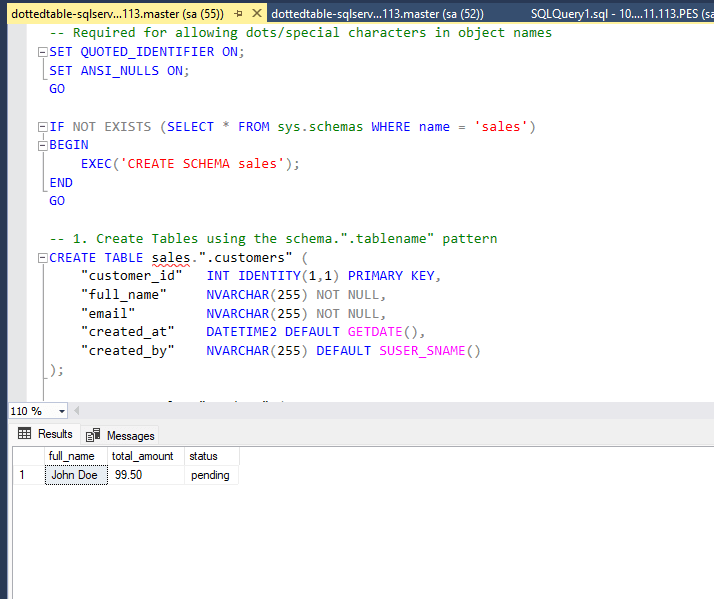
SQL Server supports the pattern through SET QUOTED_IDENTIFIER ON. The dot remains inside the brackets or double quotes.
Implementation:
-- Required for allowing dots/special characters in object names
SET QUOTED_IDENTIFIER ON;
SET ANSI_NULLS ON;
GO

IF NOT EXISTS (SELECT * FROM sys.schemas WHERE name = 'sales')
BEGIN
    EXEC('CREATE SCHEMA sales');
END
GO

-- 1. Create Tables using the schema.".tablename" pattern
CREATE TABLE sales.".customers" (
    "customer_id"   INT IDENTITY(1,1) PRIMARY KEY,
    "full_name"     NVARCHAR(255) NOT NULL,
    "email"         NVARCHAR(255) NOT NULL,
    "created_at"    DATETIME2 DEFAULT GETDATE(),
    "created_by"    NVARCHAR(255) DEFAULT SUSER_SNAME()
);

CREATE TABLE sales.".orders" (
    "order_id"      INT IDENTITY(1,1) PRIMARY KEY,
    "customer_id"   INT NOT NULL,
    "order_date"    DATETIME2 DEFAULT GETDATE(),
    "total_amount"  DECIMAL(18, 2),
    "status"        NVARCHAR(50) DEFAULT 'pending',
    CONSTRAINT FK_orders_customer FOREIGN KEY ("customer_id")
        REFERENCES sales.".customers"("customer_id")
);

-- 2. Create Indexes
CREATE INDEX IX_orders_customer ON sales.".orders"("customer_id");
GO

-- 3. Create Procedure using the pattern
CREATE PROCEDURE sales."usp_create_order"
    @customer_id INT,
    @amount DECIMAL(18,2)
AS
BEGIN
    INSERT INTO sales.".orders" ("customer_id", "total_amount")
    VALUES (@customer_id, @amount);
END;
GO

-- 4. Seed Data
INSERT INTO sales.".customers" ("full_name", "email")
VALUES ('John Doe', 'john@example.com');

EXEC sales."usp_create_order" @customer_id = 1, @amount = 99.50;

-- 5. Final Query (Note the mandatory double quotes)
SELECT
    c."full_name",
    o."total_amount",
    o."status"
FROM sales.".customers" AS c
JOIN sales.".orders" AS o ON c."customer_id" = o."customer_id";
GO
Execution Results:
ClickHouse: Real-time Analytics
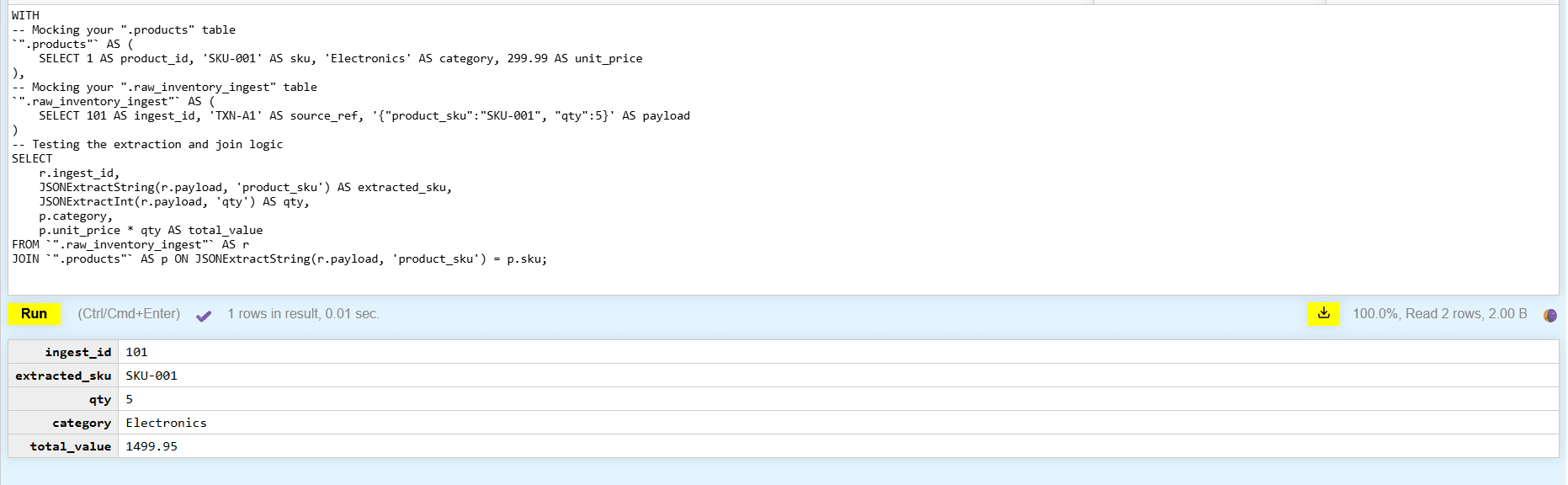
ClickHouse implementation uses backquotes to wrap the dotted table names, maintaining consistency even in OLAP environments.
Implementation:
WITH
-- Mocking your ".products" table
`".products"` AS (
    SELECT 1 AS product_id, 'SKU-001' AS sku, 'Electronics' AS category, 299.99 AS unit_price
),
-- Mocking your ".raw_inventory_ingest" table
`".raw_inventory_ingest"` AS (
    SELECT 101 AS ingest_id, 'TXN-A1' AS source_ref, '{"product_sku":"SKU-001", "qty":5}' AS payload
)
-- Testing the extraction and join logic
SELECT
    r.ingest_id,
    JSONExtractString(r.payload, 'product_sku') AS extracted_sku,
    JSONExtractInt(r.payload, 'qty') AS qty,
    p.category,
    p.unit_price * qty AS total_value
FROM `".raw_inventory_ingest"` AS r
JOIN `".products"` AS p ON JSONExtractString(r.payload, 'product_sku') = p.sku;
Execution Results:
ORM Implementation
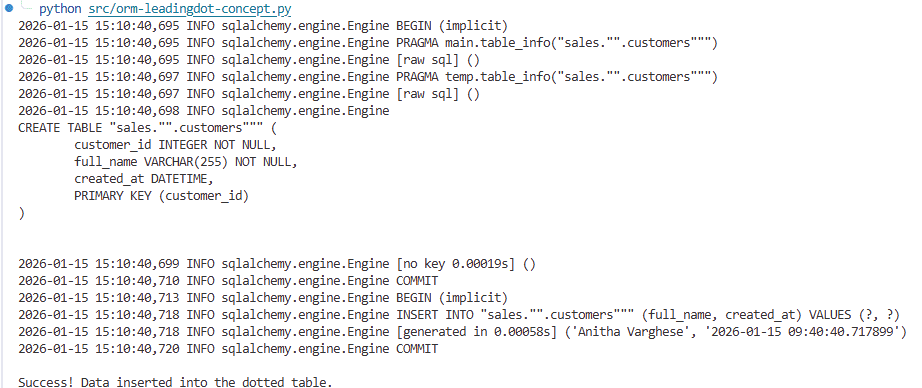
When using an ORM, you map the model name to the physical hidden table name using specific mapping attributes.
Example (SQLAlchemy):
import datetime
from sqlalchemy import create_engine, Column, Integer, String, DateTime, text
from sqlalchemy.orm import declarative_base, sessionmaker

# 1. Use modern SQLAlchemy 2.0 base
Base = declarative_base()

class Customer(Base):
    # This exactly matches your requirement for leading dots
    # SQLite will create a table named: [sales.".customers"]
    __tablename__ = 'sales.".customers"'

    customer_id = Column(Integer, primary_key=True, autoincrement=True)
    full_name = Column(String(255), nullable=False)
    created_at = Column(DateTime, default=datetime.datetime.utcnow)

# 2. Use 'echo=True' to see the generated SQL in your terminal
engine = create_engine('sqlite:///orm-leadingdot-check.sqlite.db', echo=True)

# 3. Create the table
Base.metadata.create_all(engine)

# 4. Verify insertion
Session = sessionmaker(bind=engine)
with Session() as session:
    new_user = Customer(full_name="Anitha Varghese")
    session.add(new_user)
    session.commit()
    print("\nSuccess! Data inserted into the dotted table.")
Execution Results:
Results Summary
| Environment | Hidden Table Syntax | Quoting Strategy |
|---|---|---|
| SQLite | ".tablename" | Double Quotes |
| DuckDB | ".tablename" | Schema-prefixed Double Quotes |
| PostgreSQL | ".tablename" | Schema-prefixed Double Quotes |
| SQL Server | ".tablename" | Quoted Identifiers (" ") |
| ClickHouse | ".tablename" | Backquotes |
| ORM | @map(".tablename") | Model Mapping |
Pros and Cons of the Ideology
Pros (The "Internal Logic" Win)
- Refactoring Freedom: You can replace
.customer_v1with.customer_v2and simply point thecustomerview to the new one without breaking application code. - Safety Guardrail: Prevents
SELECT *in applications because wrapper views explicitly list columns, acting as a fixed contract. - Visual Hierarchy: It is immediately obvious which objects are "Raw Data" (Hidden) and which are "Clean API" (Views).
Cons (The "Operational" Cost)
- Escape Character Fatigue: Developers must remember to use
",[], or`for raw tables. This is intentional friction to discourage direct table access, but it may impact emergency debugging speed. - DML Limitations: Inserting into complex views may require
INSTEAD OFtriggers or direct insertion into the hidden physical tables. For simple wrapper views, inserts may work directly depending on the RDBMS. - Portability: The
.convention is not universal. Use dots for SQLite/DuckDB but underscores for Postgres/SQL Server/Oracle/MySQL.
Wrapper Views
For every hidden physical table (dotted or underscored) that needs to be accessed, we generate a wrapper view whose name is the table name without the leading dot or underscore.
Key characteristics:
- View name:
customer(no prefix) - Table name:
.customeror_customer(with prefix) - Explicitly list columns rather than using
SELECT * - Protects downstream queries from accidental schema drift
- Makes the view a clear contract
Automated Wrapper View Generator (SQLite)
To avoid hand-maintaining these wrappers, views can be generated automatically using SQLite system metadata.It will help you enforce the "Physical-Hidden / Logical-Public" architecture without manual overhead.The script emits DROP VIEW IF EXISTS followed by CREATE VIEW statements, so rerunning it always recreates fresh, deterministic views.
.It ensures that every table prefixed with a dot gets a corresponding clean view that explicitly lists columns to protect against schema drift.
/*
Enforces separation between physical storage and query access.
*/

WITH dotted_tables AS (
  SELECT
    s.name AS table_name,
    substr(s.name, 2) AS view_name
  FROM sqlite_schema AS s
  WHERE s.type = 'table'
    AND s.name LIKE '.%'
    AND s.name NOT LIKE 'sqlite_%'
),
column_lists AS (
  SELECT
    dt.table_name,
    dt.view_name,
    (
      SELECT group_concat(quote(p.name), ', ')
      FROM pragma_table_info(dt.table_name) AS p
      ORDER BY p.cid
    ) AS col_list
  FROM dotted_tables AS dt
),
ddl AS (
  -- 1. Drop existing wrapper views for idempotency
  SELECT
    dt.view_name AS object_name,
    10 AS ord,
    'DROP VIEW IF EXISTS ' || quote(dt.view_name) || ';' AS sql
  FROM dotted_tables AS dt

  UNION ALL

  -- 2. Recreate wrapper views with explicit column lists
  SELECT
    cl.view_name AS object_name,
    20 AS ord,
    'CREATE VIEW ' || quote(cl.view_name)
    || ' AS SELECT '
    || cl.col_list
    || ' FROM '
    || quote(cl.table_name)
    || ';' AS sql
  FROM column_lists AS cl
  WHERE cl.col_list IS NOT NULL
    AND cl.col_list <> ''
)
SELECT sql
FROM ddl
ORDER BY object_name, ord;
Usage Instructions
Below is a clear and correct way to express the cat-based commands for SQLite, aligned with your usage instructions.
Using cat to generate and execute wrapper views
Generate the wrapper SQL file:
cat views-for-dotted-tables.sql | sqlite3 your_db.db > wrapper_views.sqlExecute the generated wrapper views:
cat wrapper_views.sql | sqlite3 your_db.dbNotes
- The first command feeds
views-for-dotted-tables.sqlintosqlite3and captures the generated output inwrapper_views.sql. - The second command executes the generated SQL against the same database.
- This is functionally equivalent to using input redirection (
<) but may be preferable when composing pipelines or scripts.
Tables
Physical tables represent stored data and should be treated as internal implementation details.
Guidelines
- Use concrete domain nouns:
user,device,policy,audit_event - Relationship tables use meaningful compound nouns:
user_role,account_membership,policy_control - Tables must be singular and use lowercase with underscores
- Avoid vague nouns:
data,info,record,item(unless your domain genuinely uses these terms) - Prefix physical tables with a leading dot (SQLite/DuckDB) or underscore (other RDBMS) to discourage direct querying
Examples
| Bad | Good | Why |
|---|---|---|
users | .user | Singular with leading prefix |
t_device | .device | No prefix, use hidden convention instead |
policy_data | .policy | No vague terms |
user_info | .user | No generic suffixes |
device_table | .device | No type suffixes |
Physical Table Storage
Physical tables are internal implementation details. This abstraction allows for Refactoring Safety: if we must replace .customer with .customer_v2, the public view customer remains stable, preventing any downtime for downstream consumers.
| Table Name | Purpose | Platform Compatibility |
|---|---|---|
.customer | Internal storage for customers | SQLite/DuckDB/PostgreSQL/SqlServer/ORM |
.customer_order | Internal storage for orders | Same |
.order_line | Internal storage for order line items | Same |
.product | Internal storage for products | Same |
Ergonomics Examples: Tables vs Views
Example 1: Simple Table vs Wrapper View
Physical table (discouraged to query directly):
-- Table name: .customer
SELECT *
FROM ".customer";
Even a simple filter forces quoting (SQLite) or feels "off":
-- SQLite
SELECT name, email
FROM ".customer"
WHERE status = 'active';

-- PostgreSQL
SELECT name, email
FROM _customer
WHERE status = 'active';
Wrapper view (intended access surface):
-- View name: customer
SELECT name, email
FROM customer
WHERE status = 'active';
Path of Least Resistance
The path of least resistance is obvious. Clean and natural.
Example 2: Joins Amplify the Inconvenience
Physical tables: .customer_order, .order_line, .product (or underscored equivalents)
Direct join on tables (awkward and noisy):
-- SQLite
SELECT
  o.id,
  p.sku,
  ol.quantity
FROM ".customer_order" AS o
JOIN ".order_line" AS ol ON ol.order_id = o.id
JOIN ".product" AS p ON p.id = ol.product_id;

-- PostgreSQL
SELECT
  o.id,
  p.sku,
  ol.quantity
FROM _customer_order AS o
JOIN _order_line AS ol ON ol.order_id = o.id
JOIN _product AS p ON p.id = ol.product_id;
Every identifier must be quoted (SQLite) or prefixed with underscore (PostgreSQL), and the query is visually cluttered.
Wrapper views: customer_order, order_line, product
Join via views (clean and readable):
SELECT
  o.id,
  p.sku,
  ol.quantity
FROM customer_order AS o
JOIN order_line AS ol ON ol.order_id = o.id
JOIN product AS p ON p.id = ol.product_id;
Everything reads normally without quoting or cognitive friction.
Example 3: Layered Logic Belongs in Views
Physical table: .invoice
Base wrapper view: invoice
Derived view with logic: invoice_open
Table access (logic repeated everywhere):
SELECT *
FROM ".invoice"
WHERE paid_at IS NULL
  AND canceled_at IS NULL;
Canonical wrapper view definition (written once):
CREATE VIEW invoice AS
SELECT
  invoice_id,
  customer_id,
  amount,
  issued_at,
  paid_at,
  canceled_at
FROM ".invoice";
Derived view with business logic:
CREATE VIEW invoice_open AS
SELECT
  invoice_id,
  customer_id,
  amount,
  issued_at
FROM invoice
WHERE paid_at IS NULL
  AND canceled_at IS NULL;
Developer usage:
SELECT *
FROM invoice_open;
The hidden physical table becomes effectively invisible in day-to-day work.
Example 4: Refactoring Safety
Scenario: Physical table renamed from .customer to .customer_v2
Wrapper view stays stable: customer
Old queries keep working:
SELECT id, name
FROM customer;
Schema Evolution Safety
Only the wrapper view definition changes. No downstream SQL needs to be touched. This is schema evolution safety in action.
Views
Views are the public access surface that all consumers should use for querying and reporting.
Guidelines
- Name the resulting concept, not the operation
- If the view represents "latest", "current", or "active" data, include that in the noun phrase
- Views should be singular nouns in lowercase with underscores
- No prefixes like
v_or suffixes like_view - Avoid technical or implementation-specific names
Wrapper View Pattern
For every hidden physical table, create a wrapper view without the leading prefix:
CREATE VIEW customer AS
SELECT
  customer_id,
  name,
  email,
  status,
  created_at,
  updated_at
FROM ".customer";
Why Explicit Column Lists Matter
- Protects against accidental schema drift
- Changes to underlying tables don't silently propagate
- Makes the view a clear, documented contract
- Never use
SELECT *in wrapper views - always list columns explicitly
Derived Views
Complex or recurrent logic should be encapsulated in derived views.
| Bad | Good | Why |
|---|---|---|
device_filtered | compliant_device | Names the concept, not the operation |
user_latest | active_user | Describes the semantic meaning |
evidence_rollup_view | latest_policy_evidence | No _view suffix |
v_current_policy | current_policy | No v_ prefix |
Example derived view:
CREATE VIEW invoice_open AS
SELECT
  invoice_id,
  customer_id,
  amount,
  issued_at
FROM invoice
WHERE paid_at IS NULL
  AND canceled_at IS NULL;
This consolidates business logic in one place and improves maintainability.
Columns
Primary Keys
- Pattern:
<tablename>_id - Example:
user_id,device_id,policy_id
Foreign Keys
- Pattern:
<referenced_table>_id - Example:
user_id(referencesuser),policy_id(referencespolicy)
Timestamps
Be explicit about semantic meaning:
| Context | Column Name | Use When |
|---|---|---|
| Record creation | created_at | Timestamp of row creation |
| Record modification | updated_at | Timestamp of last update |
| Observation time | observed_at | When data was observed in the real world |
| Ingestion time | ingested_at | When data entered the system |
| Effective date | effective_at | When something becomes active |
| Expiration date | expires_at | When something becomes inactive |
Booleans
Use prefixes that read naturally in conditionals:
is_active,is_compliant,is_verifiedhas_permission,has_access,has_expiredcan_read,can_write,can_delete
Abbreviations
Avoid abbreviations unless they're universal in your team's domain.
| Bad | Good |
|---|---|
usr_nm | user_name |
dev_sts | device_status |
pol_eff_dt | policy_effective_at |
Indexes
Pattern
- Default:
<table>_<column>_idx - Composite:
<table>_<col1>_<col2>_idx - Unique:
<table>_<column>_uniqor<table>_<col1>_<col2>_uniq
Examples
| Bad | Good | Why |
|---|---|---|
idx_1 | user_email_idx | Descriptive, debuggable |
user_idx | user_created_at_idx | Specifies the column |
ix_device | device_serial_number_uniq | Clear uniqueness constraint |
Why This Matters
During incidents, you need to know immediately what an index does. Generic names are useless.
Constraints
Guidelines
- Name the rule, not the mechanism
- Make the business logic clear from the name
- Avoid auto-generated names in production schemas
Examples
| Bad | Good |
|---|---|
check_1 | user_email_must_be_unique |
fk_user_device | device_user_id_references_user |
constraint_abc | policy_effective_at_required |
Consistency Checks
Vocabulary Consistency
- Pick one term and stick with it:
device_statusvsdevice_state— choose one - No mixed vocabulary:
customervsclientvstenant— choose one canonical noun - Document your choices: Maintain a glossary of domain terms
No Query Intent in Names
Avoid encoding usage patterns in object names:
- ❌
reporting_user - ❌
tmp_device - ❌
test_policy - ❌
adhoc_audit
No Leaking Technical Details
Don't expose storage or implementation choices unless it represents a stable architectural layer:
- ❌
json_data - ❌
raw_events - ❌
staging_user(unless "staging" is a genuine domain concept)
surveilr-Specific Conventions
Core Domain Nouns
Treat these as first-class nouns in the surveilr domain model:
- Resource:
resource,uniform_resource,file_resource,email_message - Evidence:
policy_evidence,control_evidence,evidence_assertion - Provenance:
provenance_event(distinct fromaudit_event)
Time Semantics
Use ingested_ or observed_ prefixes only when time semantics are critical:
ingested_at— when data entered surveilrobserved_at— when data was observed in the source system
Audit vs Provenance
Keep these concepts distinct:
audit_event— compliance and security audit trailsprovenance_event— data lineage and transformation history
Quick Review Script
Say these sentences out loud. If they sound awkward, rename the object.
For tables and views:
Row Test
"One row in [object_name] is a ______."
If that sentence sounds weird, rename it.
For columns:
Value Test
"This column is the ______ of the ______."
If you need to hand-wave or explain, rename the column.
Summary of Best Practices
- Favor views over tables — make views the public and stable query surface.
- Use the "Hidden" convention — Use a leading dot (
.) for SQLite/DuckDB or leading underscore (_) for PostgreSQL/SQL Server/Oracle/MySQL for all physical tables. - Respect platform constraints — Follow the spirit of the "internal" signal while respecting the specific RDBMS quoting rules.
- Generate wrapper views — Use automated scripts to ensure views stay in sync with hidden physical tables.
- Contractual Wrapper Views — Never use
SELECT *in wrapper views; explicitly list columns to protect against accidental schema drift. - Existing Databases — If data is already present and migration to hidden names is "too hard," consult the architecture lead before proceeding.
Implementation Guide
Generating Wrapper Views
Use the automated view generator script(described above) to create and refresh wrapper views:
How it works:
- Queries SQLite system metadata to find all hidden physical tables (dotted or underscored)
- Emits
DROP VIEW IF EXISTSstatements for idempotency - Generates
CREATE VIEWstatements with explicit column lists - Designed to run as a generator with output executed in a second pass
Or in a single transaction from application code.
DML Operations on Views
Simple wrapper views: Most RDBMS allow direct INSERT, UPDATE, and DELETE operations on simple views that map 1:1 to a single table.
Complex views: Views with joins, aggregations, or complex logic may require:
- INSTEAD OF triggers (SQL Server, PostgreSQL, Oracle)
- Direct table access for write operations
- Stored procedures that encapsulate the write logic
Consult your RDBMS documentation for specific view updatability rules.
Migration Strategy
When adopting this pattern in existing schemas:
- Rename existing tables to hidden versions (e.g.,
customer→.customer) - Generate wrapper views using the script
- Test thoroughly - all existing queries should work unchanged
- Update documentation to reference views, not tables
- Establish the pattern for all new tables going forward
Performance Considerations
View overhead: Modern query optimizers typically inline simple wrapper views with minimal overhead. For complex derived views, consider:
- Indexed views / materialized views for frequently-accessed aggregations
- Query plan analysis to verify optimization
- Periodic performance testing as data volumes grow
The benefits of maintainability and schema stability typically outweigh minor performance costs.
Key Takeaways
The Core Insight
The hidden table strategy does not forbid table access—it just makes it unpleasant. Developers naturally gravitate toward the clean, readable option. Views become the default habit, not because of policy, but because they are simply easier to work with.
Over time, tables fade into the background as implementation details, which is exactly where we want them. This gives surveilr the flexibility to evolve schemas safely while maintaining a stable, well-documented public interface for all SQL consumers.
How is this guide?
Last updated on